

We create customized UGotClass weblinks for our partners that contain their logo, registration contact information, and chosen course offerings so that you can access the full descriptions, weekly agendas, course objectives, learning outcomes, and instructor biographies for each of our courses. If you are unsure of your organization's URL, just ask!
In case you are unsure what to do with yours, here are suggestions from our other partners:
- Use it for internal reference
There are many UGotClass partners that choose to keep this weblink private from their students. Their staff use it to quickly look up course information when a student has more detailed questions about a course or certificate. It also makes it easy to copy and paste the course descriptions for your print brochure/registration site/wherever else you'll be advertising the courses. If you are a Lumens user, students will see a course description and instructor information on your Lumens site. If they have questions about the course outcomes, learning objectives, future course offerings, or the weekly agenda, your customized weblink will be a valuable resource for you and your colleagues. - Link it to your website
There are two ways that this can be done. We have noticed higher enrollments coming in from partners that link to their website in this first way, but it does require a little bit more work up front. Ask your tech support to create a custom URL for your website, and then redirect your students there. For example: www.yourwebsite.edu/UGConline. Students who enter this URL or click this link would still be taken to the yougotclass.org website, but they are less likely to have typing mistakes. Plus, your students know and trust you. They will be much more likely to go to a website for an organization they are familiar with.
If you aren't able to create this URL right away, you can paste it right onto your website. Many partners put a short description of their partnership with UGotClass and then paste their www.yougotclass.org/... weblink there. It isn't quite as effective, but students looking for an online course will still be able to find it. Your customized UGotClass weblink contains the phone number and email address that students should contact if they ready to register or have questions about any of the courses or certificates.
 - Create Repetitive Webpages
Our top partners create repetitive webpages for their top 5-10 enrolling UGotClass programs. Create web pages that repeat the same UGotClass certificate and course titles. That boosts your SEO (search engine optimization) rankings. The higher your rankings, the more likely your organization’s web page will appear on the first page of a search term, and the higher up on that page it will appear. It also makes it easier for students to find what they’re looking for if it is listed in multiple places. So create a webpage on your site for the Certificate in Data Analysis (right now our most popular) in the "Online" courses category, under "Business Skills" and with your "Professional Skills" courses. You can copy and paste wording from your weblink or just link to the Certificate's page within your UGotClass weblink.What NOT To Do: - Add it to your Print Brochure
The chance for typos is enormous! Additionally, many people are not comfortable visiting a website that they are unfamiliar with.- If you and your staff take your own UGotClass registrations, you don't have to put anything additional with the course description.
- Since you take the UGotClass registrations the same way students register for any other course, you don't need to add anything. If students contact you with questions about the course, you can send them the full link by email.
- If LERN staff takes registrations on your behalf, it's still possible to send students to your online registration link without printing your full UGotClass URL.
- If your website manager has been able to create that "www.yourwebsite.edu/UGConline -type" link for you that we mentioned above, post that! It will be shorter, easier to remember, and your students will trust it.
- If you were not able to create a designated URL on your website, just direct students to your website to register. "Click the "Online Offerings" category on our website for registration information" doesn't take up much more room than "http://www.yougotclass.org/catalog-complete.cfm/Lern" and it takes up even less room than"http://www.yougotclass.org/courses.cfm/Lern/Certificate-in-Accounting-and-Finance-for-Non-Financial-Managers".
- Consider a QR code. Students can be directed to your weblink by scanning the code on their smart phones.
- And if none of the above options will work for you, you can always add our contact information. Write "Email info@ugotclass.org or Call 855-846-8252 for more details and registration information".
- If you and your staff take your own UGotClass registrations, you don't have to put anything additional with the course description.
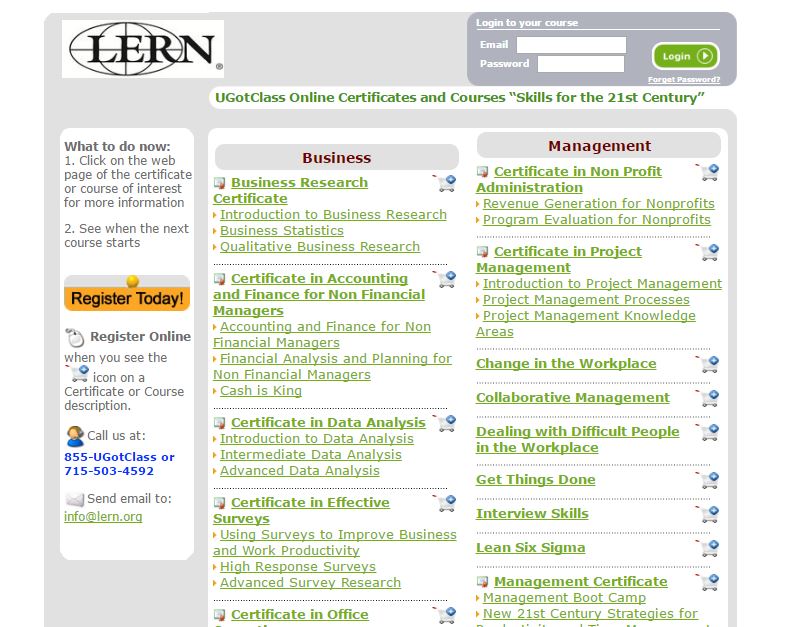
Depending on your website, registration software, and number of staff, you might have other ideas for how to use your weblink. No matter how you use it, we're sure you and your staff will find it a valuable resource.
Know that we do not automatically update these weblinks. In fact, we will never add anything new to your weblink without hearing from you first. The only thing we'll change is removing courses that are no longer offered - We want to make sure that you know what you are offering and have a chance to review everything before it goes active on your weblink and students are able to see it. We add new programs twice a year. Around August or September, we will release information on courses and certificates premiering the coming spring. In March or April, we'll let you know what's new for the next fall. We'll include this information in an email (sent to our primary contact), your monthly newsletter, and post it on our blog. Once we release this information, look it over and send us an email to tell us what we should add to your weblink.
Our “UGotClass 101” series of blog posts is here to help our partners navigate through the partnership. View All UGC 101 Posts